Real-time metrics
PgDog Enterprise collects and transmits its own metrics to the control plane, at a configurable interval (1s, by default). This provides a real-time view into PgDog internals, without a delay that's typically present in other monitoring solutions.
How it works
Real-time metrics are available in both Open Source and Enterprise versions of PgDog. The open source metrics are accessible via an OpenMetrics endpoint or via the admin database.
In PgDog Enterprise, the same metrics are collected and sent via a dedicated connection to the control plane. Since metrics are just numbers, they can be serialized and sent quickly. To deliver second-precision metrics, PgDog requires less than 1KB/second of bandwidth and little to no additional CPU or memory.
Configuration
The intervals at which metrics are uploaded to the control plane are configurable in pgdog.toml:
[control]
metrics_interval = 1_000 # 1s
endpoint = "https://control-plane-endpoint.cloud.pgdog.dev"
token = "cff57e5c-7c4f-4ca0-b81c-c8ed22cf873d"
The default value is 1 second, which should be sufficient to debug most production issues.
Web UI
Once the metrics reach the control plane, they are pushed down to the web dashboard via a real-time connection. Per-minute aggregates are computed in the background and stored in a separate PostgreSQL database, which provides a historical view into overall database performance.
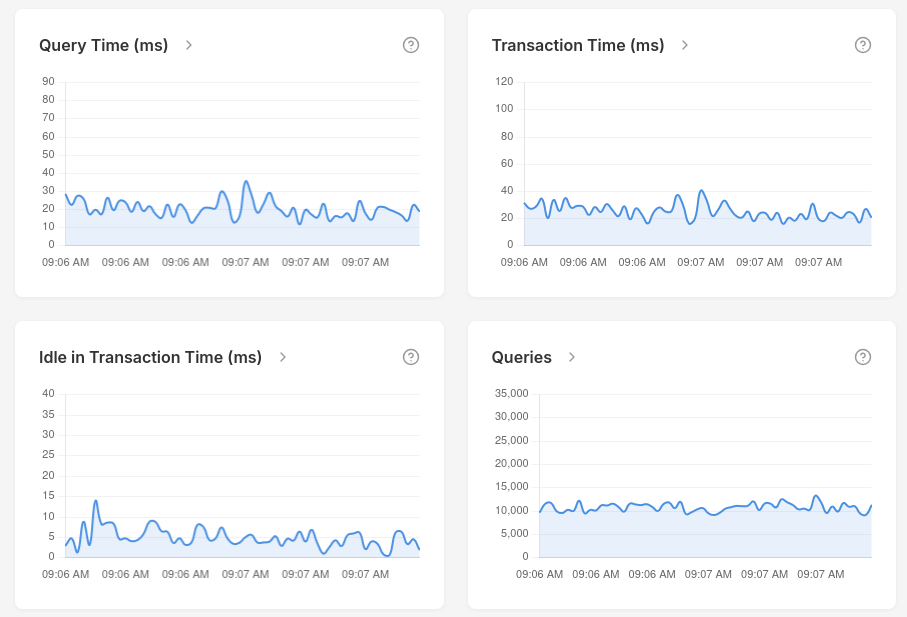
Available dashboard metrics
Dashboard metrics are distinct from the OpenMetrics endpoint. They use millisecond units throughout and are collected at specified intervals.
Connection pool
| Metric | Description |
|---|---|
| Clients | Total number of clients connected to PgDog. |
| Server Connections | Total server connections open across all pools. |
| Connection Rate (cps) | New server connections established from PgDog to PostgreSQL per second. |
| Waiting | Clients currently queued waiting for a server connection. |
| Max Wait (ms) | Age of the oldest client currently waiting for a connection. Resets to zero when the queue drains. Useful for spotting individual outlier waits. |
| Idle Connections | Server connections open and available for use. |
| Idle in Transaction Connections | Server connections currently idle inside an open transaction. Historical chart data for this metric is not currently tracked and will show zero. |
| Checked Out | Server connections currently serving an active client request. |
| Instances | Number of PgDog instances currently connected to the control plane. |
Errors
| Metric | Description |
|---|---|
| Errors | Client-facing errors per second across all pools. |
| Server Errors | Errors reported by upstream PostgreSQL servers per second. |
Query throughput
| Metric | Description |
|---|---|
| Queries | Queries executed through PgDog per second. |
| Transactions | Transactions completed per second. |
| Transaction Rate (tps) | Rolling average transactions per second. |
| Query Rate (qps) | Rolling average queries per second. |
| Blocked Queries | Queries blocked by lock contention per second. |
Timing and latency
| Metric | Description |
|---|---|
| Query Time (ms) | Total query execution time per second. Does not include connection wait. |
| Transaction Time (ms) | Total transaction execution time per second. Includes idle-in-transaction time; does not include connection wait. |
| Idle in Transaction Time (ms) | Time per second spent idle inside open transactions. Elevated values indicate clients holding transactions open without executing queries. |
| Wait Time (ms) | Total time all clients spent waiting for a server connection per second. Unlike Max Wait, this stays elevated when many clients are waiting briefly. |
| Query Response Time (ms) | Full client-observed query latency per second, including connection wait time. |
| Transaction Response Time (ms) | Full client-observed transaction latency per second, including connection wait time. |
Max Wait vs Wait Time
Max Wait captures the worst single waiter at one instant — it drops to zero the moment that client is served. Wait Time measures total queuing burden per second across all clients — it stays elevated when many clients are waiting briefly. Use both together: high Max Wait with low Wait Time points to a single slow client; high Wait Time with low Max Wait indicates widespread shallow queuing.
Network throughput
| Metric | Description |
|---|---|
| Bytes Received (MB) | Megabytes received from PostgreSQL servers per second. |
| Bytes Sent (MB) | Megabytes sent to PostgreSQL servers per second. |
Memory and caching
| Metric | Description |
|---|---|
| Prepared Statements | Number of prepared statements in the PgDog global cache. |
| Prepared Statements Memory (MB) | Memory consumed by the prepared statements cache. |
| Query Cache Size | Number of parsed queries stored in the query cache. |
| Query Cache Hits | AST query cache hits per second. |
| Query Cache Misses | AST query cache misses per second. |
| Query Cache Hit Rate (%) | Percentage of queries served from the query cache. |
| Direct Shard Queries | Queries routed to a single shard per second. |
| Cross-Shard Queries | Queries broadcast to multiple shards per second. |
| Direct Shard Hit Rate (%) | Percentage of queries that avoided a cross-shard fanout. |
Query stats
| Metric | Description |
|---|---|
| Query Stats Tracked Queries | Number of unique query fingerprints currently tracked. |
| Query Stats Memory (MB) | Memory consumed by the query stats store. |